
Customer data and privacy
Sanil Booking Kit stores customer and booking details in your WordPress database. Your site’s mail provider handles notification emails. If you enable an online gateway, its extension can share payment information with that provider. The PayPal extension sends the amount, currency, booking reference and return URLs. Customers enter their payment details on PayPal’s hosted checkout.
Manage customer records
Open a customer to see contact details, booking history, flags and Private notes. Notes are visible to your team and save when you click away. Contact details use Save details.
Only give customer access to teammates who need it, through Settings → Team and access.
Configure consent and retention
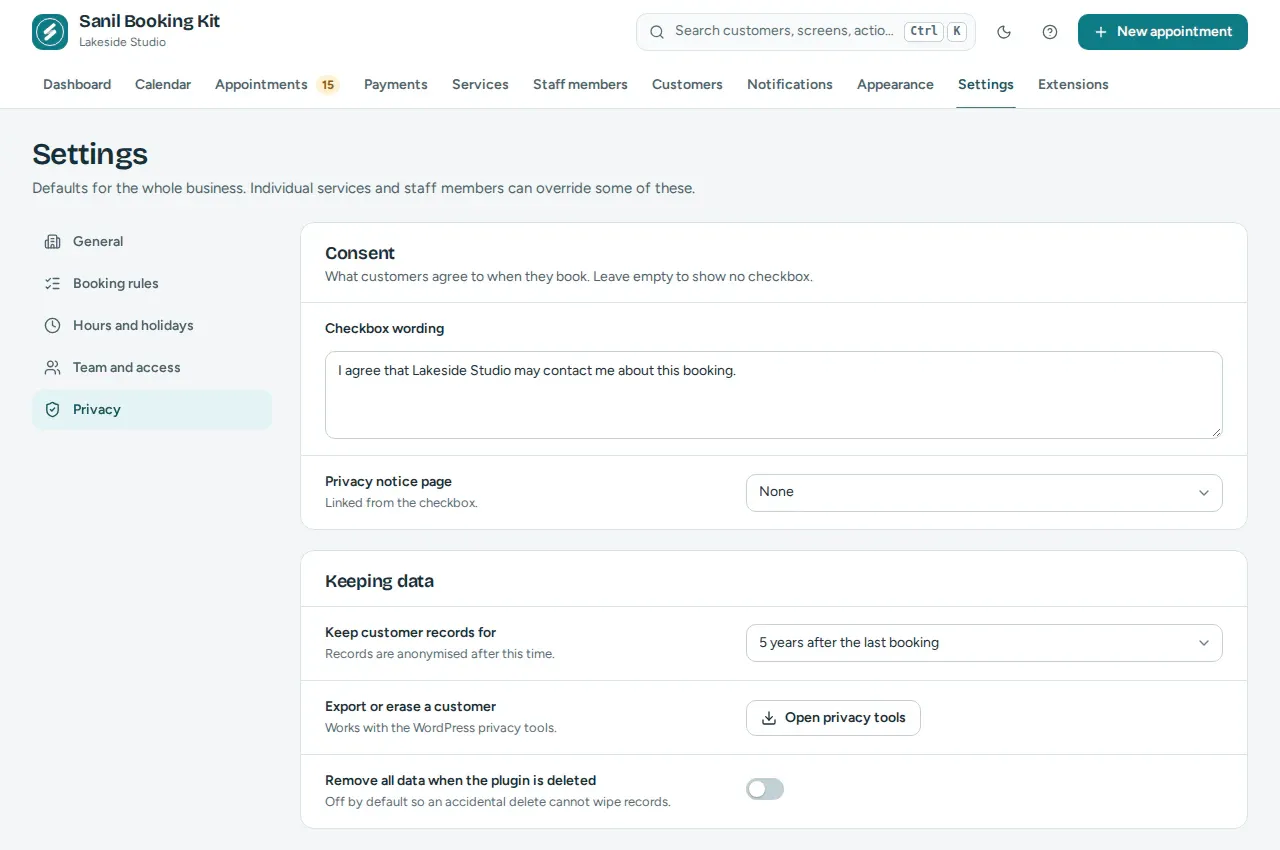
In Settings → Privacy, set Checkbox wording and choose a published Privacy notice page. Leaving the wording empty shows no consent checkbox.
Choose one, two or five years after the last booking, or Until I delete them. The default is five years. The daily retention job anonymises old records, so WP-Cron must run reliably.
Click Save settings after changing these options.
Export, anonymise or erase
Use WordPress Tools → Export Personal Data and Tools → Erase Personal Data for requests by email address. The plugin integrates with these tools; anonymisation removes identifying information while keeping appointment records.
The customer record’s Erase action permanently deletes the customer record and removes the customer from their appointments. An appointment is deleted if nobody remains on it and it has no payment history to retain.
Deleting the plugin
Plugin deletion keeps its data by default. See Data after deleting the plugin before enabling full data removal.